
Want exclusive cosmetics in Highguard without spending a dime? The game’s first Twitch Drops campaign launched alongside the January 26, 2026 release and runs through February 9, 2026. Simply watch participating streamers for two hours total to claim two exclusive cosmetic items—completely free. Here’s everything you need to know to maximize your loot.
Table of Contents
All Highguard Twitch Drops Rewards
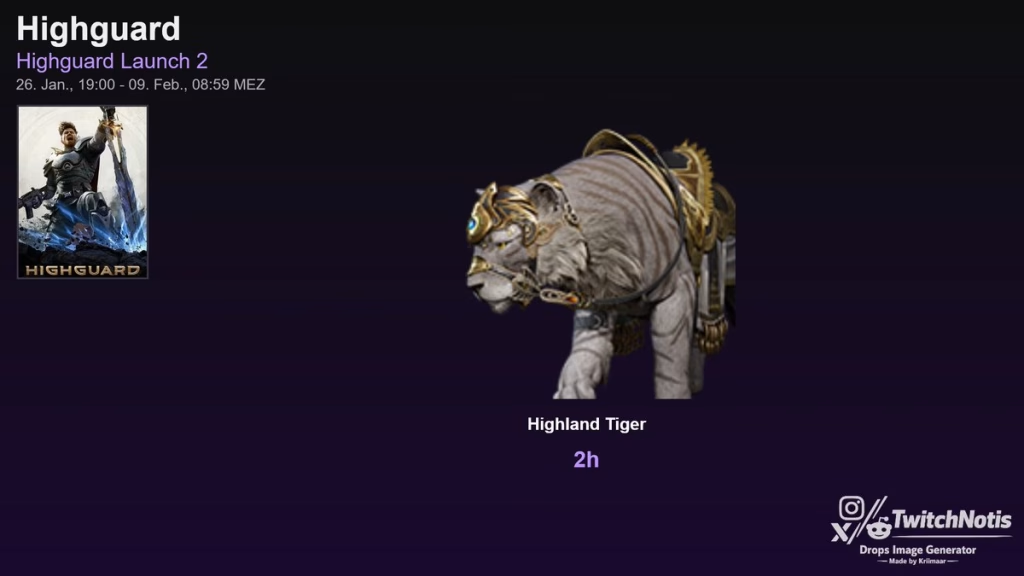
The launch Drops campaign celebrates Highguard’s debut with two exclusive cosmetic items. While Wildlight Entertainment hasn’t revealed the exact items publicly, players who’ve claimed them report receiving:
| Reward Tier | Watch Time Required | Reward Type |
|---|---|---|
| Drop 1 | 1 hour cumulative | Exclusive cosmetic item (weapon skin or Warden outfit) |
| Drop 2 | 2 hours cumulative | Exclusive cosmetic item (mount skin or emote) |
These cosmetics are launch-exclusive, meaning they won’t be available in the in-game store later. For competitive shooter fans, this represents a rare opportunity to secure limited-edition items that showcase your day-one participation.
How to Link Your Accounts & Claim Drops
Step 1: Link Your Twitch Account to Highguard
- Visit the PlayHighguard Portal account settings page
- Log in using your game platform (Steam, PlayStation, or Xbox)
- Click on “Linked Accounts” from the left menu
- Find Twitch under “Providers” and click “Link”
- Authorize your Twitch account in the new window
- Refresh your browser to confirm the connection
Step 2: Watch Drops-Enabled Streams
- Go to Twitch.tv and search for “Highguard”
- Look for channels with the “Drops Enabled” tag
- Watch for 2 hours cumulative (can be split across multiple streams)
- Progress tracks automatically once accounts are linked
Step 3: Claim Your Rewards
- Check your Twitch Inventory during or after watching
- Click “Claim Now” when each drop unlocks
- Items automatically appear in your Highguard account
- Equip them from the Customization menu in-game
Campaign Details at a Glance
| Detail | Information |
|---|---|
| Start Date | January 26, 2026 (Launch Day) |
| End Date | February 9, 2026 |
| Total Watch Time | 2 hours cumulative |
| Number of Drops | 2 exclusive cosmetic items |
| Availability | All platforms (PC, PS5, Xbox) |
| Cost | 100% Free |
For esports and gaming enthusiasts, Twitch Drops provide a zero-cost method to expand your cosmetic collection while supporting your favorite content creators.
Pro Tips for Maximizing Drops
Multi-Stream Strategy: Watch time accumulates across all Drops-enabled Highguard streams. If one streamer goes offline, switch to another without losing progress.
Background Watching: Mute the stream and leave it running while you work, study, or play Highguard yourself. Watch time counts as long as the tab remains open.
Mobile App: Use the Twitch mobile app to earn drops on your phone while away from your PC or console.
Check Progress: Visit your Twitch Inventory to track drop progress in real-time. The progress bar shows exactly how much watch time remains.
Claim Immediately: Once a drop unlocks, claim it before continuing to watch. Some campaigns require claiming before the next tier starts progressing.
Why This Campaign Matters
Highguard launched with a generous free-to-play model that includes no loot boxes, no pay-to-win mechanics, and direct cosmetic purchases only. The Episode 1 War Chest already gives players 44 free items including 11 legendary skins.
These Twitch Drops extend that generosity by rewarding community engagement. Wildlight Entertainment—founded by former Apex Legends and Titanfall developers—understands that building a healthy live-service game requires respecting player time and investment.
Future Drops campaigns are expected with each major content update. Episode 2 launches in February 2026, potentially bringing new rewards.
Common Issues & Troubleshooting
Problem: “I watched for 2 hours but didn’t receive drops”
Solution: Verify your accounts are linked correctly in the PlayHighguard Portal. Unlink and relink if necessary, then watch an additional 15 minutes to trigger the reward.
Problem: “The ‘Drops Enabled’ tag isn’t showing on streams”
Solution: Not all Highguard streamers have Drops enabled. Check Twitch’s Drops Directory and filter by “Highguard” to find eligible channels.
Problem: “Progress isn’t tracking”
Solution: Ensure you’re not using ad blockers that might interfere with Twitch’s tracking. Disable browser extensions temporarily and refresh the stream.
Problem: “I claimed the drop but can’t find it in-game”
Solution: Restart Highguard completely. Items sometimes require a full reboot to sync properly.
Don’t Miss Future Drops
Based on Wildlight’s Episode roadmap, expect new Twitch Drops campaigns to coincide with:
- Episode 2 Launch (February 2026): New Warden, map, and likely new cosmetic drops
- Episode 3+ (March-May 2026): Seasonal themes with matching cosmetic rewards
- Special Events: Holiday-themed drops or competitive tournament tie-ins
Follow Highguard’s official Twitter/X and join the Discord community for instant notifications when new campaigns go live.
The Two-Week Window Is Your Only Chance
With the campaign ending February 9, 2026, you have exactly two weeks from launch to claim these exclusive items. Unlike store cosmetics that remain available indefinitely, Twitch Drops are time-limited by nature.
Missing this campaign means potentially losing access to these skins forever—unless Wildlight decides to re-run them later, which isn’t guaranteed.
Set aside 2 hours this week to secure your free cosmetics. Whether you’re grinding ranked matches, exploring the Episode 1 War Chest, or just learning the ropes as a new player, make sure you’ve got a Drops-enabled stream running in the background.
Visit Highguard’s official site for account linking and check Twitch’s Drops page to track your progress.
FAQs
How long do I need to watch Twitch to get all Highguard drops?
You need 2 hours of cumulative watch time on Drops-enabled Highguard streams between January 26 and February 9, 2026, to unlock both exclusive cosmetic items.
Do Highguard Twitch Drops work on all platforms?
Yes! After linking your Twitch account to your Highguard account (Steam, PlayStation 5, or Xbox Series X|S), drops work across all platforms with full cross-progression support.




