

Imagine robbing someone mid-firefight without firing a single bullet. That’s exactly what the Pickpocket Drone lets you do in Bungie’s Marathon — and it’s already the most talked-about ability in the game. The Thief shell is essentially the loot goblin of Marathon — her Pickpocket Drone not only scouts out enemies but can directly steal the highest-value loot from targets without ever confronting them directly. Here’s everything you need to master it.
For more Marathon guides and extraction shooter tips, visit Technosports.
Table of Contents
What Is the Pickpocket Drone?
The Pickpocket Drone is the Thief’s Prime Ability — a deployable, pilotable butterfly-shaped drone that can fire a hooked tether to eject the highest-value item from enemy inventories, collect loose loot from the ground, and even open and close doors. Hold To Reset
It’s part reconnaissance tool, part heist gadget — and in the right hands, it’s devastating. The concept of remotely piloted stealth tools in games draws from real-world drone warfare concepts explored on the unmanned aerial vehicle Wikipedia page.
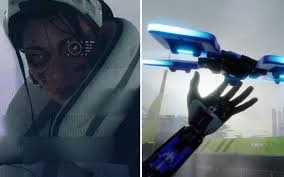
Pickpocket Drone — Full Ability Breakdown
| Feature | Details |
|---|---|
| 🎮 Ability Type | Prime Ability (Thief Shell only) |
| ⌨️ PC Controls | Q to deploy |
| 🎮 Console Controls | L1/LB + R1/RB to deploy; R1/RB or G to fire tether |
| 🎯 Primary Use | Steal highest-value item from enemy inventory |
| 🗺️ Secondary Use | Scout enemy positions, open doors, collect dropped loot |
| ⚠️ Vulnerability | Shell is completely immobile while piloting |
| 📦 Loot on Destroy | Dropped at destruction location if drone is shot down |
How to Use It Effectively — Step by Step
Step 1 — Deploy from Cover Piloting the drone leaves your character completely immobile and vulnerable — activate it only from behind cover or when teammates are nearby to guard your shell.
Step 2 — Scout Before You Steal The X-Ray Visor highlights hostiles and loot containers through walls in the colour of the most valuable item they carry Hold To Reset — use it first to identify the richest targets worth robbing.
Step 3 — Fire the Tether Once in striking distance, fire the tether to eject an item from their inventory — it drops directly in front of your target. Aim again and fire a second tether to retrieve it into the drone’s storage. Unscramble It
Step 4 — Return and Collect Fly the drone back to your location to collect the stolen goods — but if the drone is shot down mid-flight, everything it was carrying drops at the destruction site and must be recovered manually.
Beyond Stealing — The Drone’s Hidden Value
Thanks to its long-range reach and ability to ping targets, the Thief doubles as an exceptional scout — spotting ambushes or prey from a safe distance before your squad commits to a push. Unscramble It
A purple Thief core even grants invisibility while the drone is deployed — making it nearly impossible to counter when used correctly.
| Use Case | Why It Works |
|---|---|
| 🔍 Pre-fight scouting | Spot squads before engaging |
| 💰 Loot efficiency | Grab items without re-entering danger zones |
| 🚪 Flanking | Open doors remotely to create distractions |
| 🤝 Team play | Share enemy positions with squad via pings |
Want more Marathon shell guides and extraction shooter strategies? Check out Technosports for daily coverage.
FAQs
Q: What happens if the Pickpocket Drone is destroyed while carrying stolen loot?
All loot stored in the drone drops at the location where it was destroyed — you’ll need to physically travel there yourself to recover the items, which can be risky in contested areas.
Q: Can the Pickpocket Drone be used for anything other than stealing from players?
Yes — the drone can also open and close doors and grab loot left behind in buildings you’d rather not re-enter , making it an incredibly versatile utility tool beyond just player-vs-player theft.




