
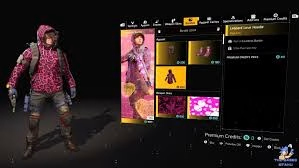
Agents, Valentine’s Day just got more tactical! The Division 2 is running the Bloody Valentine Twitch Drops campaign from February 12-19, 2026, letting you earn exclusive cosmetics just by watching partnered streamers. Whether you’re chasing the Secret Heart weapon skin or want to support your favorite content creators, this week-long event offers easy rewards—no combat required.
How to Setup & Claim Twitch Drops
Getting these drops requires proper account linking before you start watching. Here’s the setup process:
- Log into your Twitch account and navigate to Settings → Connections
- Link your Ubisoft Connect account (create one at Ubisoft.com if needed)
- In Ubisoft Connect, verify your gaming platform (PC, PlayStation, Xbox) is connected
- Watch any Division 2 stream with “Drops Enabled” tag from partnered creators
- Claim rewards directly on Twitch when they unlock
- Log into The Division 2 on your platform to receive items
Your watch time stacks across multiple channels, so feel free to switch streams without losing progress. You can track your progress under Twitch Inventory or visit the official Ubisoft Drops portal for detailed instructions.
| Watch Time | Reward | Description |
|---|---|---|
| 30 minutes | Secret Heart Weapon Skin | Valentine-themed cosmetic for your firearms |
| Campaign Runtime | Feb 12-19, 2026 | 7-day window to accumulate watch time |
Event Timing & Stream Availability
The Twitch Drops campaign runs exactly 7 days: February 12 at 12:00 AM PST through February 19 at 11:59 PM PST. This timing coincides with the larger Bloody Valentine in-game event (Feb 12-26), which features the return of the Bloody Houndsman boss and themed Reanimated Global Event content.
Only partnered content creators with drops enabled count toward your progress. Look for the green “Drops Enabled” tag under stream titles. Popular Division 2 streamers typically go live during peak hours: 12:00 PM – 10:00 PM EST on weekdays, with extended weekend coverage.
Bloody Valentine In-Game Event Connection
While you’re farming Twitch rewards, don’t miss the simultaneous in-game Bloody Valentine Event! Hunt down Mini Warhounds in the open world to earn bounties for the Bloody Houndsman. Defeating this boss unlocks exclusive gear: Bloody Houndsman Mask, Gloves, and Backpack cosmetics.
The modified Reanimated Global Event runs alongside the Twitch campaign with two key changes:
- Seasonal Modifiers enabled—stack your build bonuses with headshot mechanics
- Mid-event refresh—second chance to climb tiers if you miss the first week
- Tier 5 reward: Broken Hearts Seeker Mine Skill VFX
- Tier 10 reward: Bloody Houndsman Uniform (full outfit)
Why Participate in Twitch Drops?
Unlike in-game grinds that require hours of active play, Twitch Drops reward passive viewing—you can literally earn loot while working, sleeping, or playing other games. The Secret Heart weapon skin is exclusive to this campaign, meaning it won’t be available through normal gameplay or the premium shop.
For casual players without time for endgame content, this is the easiest path to limited cosmetics. Plus, supporting Division 2 content creators helps grow the community, potentially leading to more events and developer engagement in the future.
Troubleshooting Common Issues
If rewards aren’t appearing after claiming:
- Verify your accounts are properly linked at drops.ubi.com
- Fully close and restart The Division 2 (rewards sync on login)
- Check the correct platform is selected in Ubisoft Connect settings
- Wait up to 24 hours—server delays can occur during high-traffic events
For more Division 2 event guides, build optimization tips, and loot farming strategies, bookmark TechnoSports.co.in. We cover every seasonal event, update, and meta shift so you never miss limited-time rewards!
FAQs
Do I need to actively watch streams for Division 2 Twitch Drops?
No! You can have streams playing in the background with audio muted or in another tab. Watch time accumulates automatically as long as the stream is active and you’re logged in.
Can I earn Twitch Drops on multiple platforms simultaneously?
Yes, if you link multiple gaming platforms (PC, PS5, Xbox) to one Ubisoft Connect account. However, you can only claim rewards on one platform at a time when logging into the game.




