
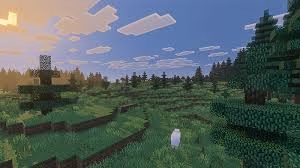
Transform your Minecraft world with 50+ stunning new biomes! Biomes O’ Plenty is one of the most downloaded Minecraft mods ever, boasting over 200 million downloads. This comprehensive guide shows you exactly how to install, configure, and explore this game-changing add-on that breathes fresh life into world generation.
Table of Contents
Minecraft Biomes O’ Plenty: Quick Overview
| Feature | Details |
|---|---|
| Biomes Added | 50+ unique biomes (Overworld & Nether) |
| Downloads | 200+ million on CurseForge |
| Requirements | Minecraft Forge + TerraBlender (1.18+) |
| Supported Versions | 1.12.2 through 1.21.1 |
| New Content | Custom trees, flowers, blocks, ores |
| Performance | Moderate—requires decent hardware |
How to Install Biomes O’ Plenty
Step 1: Install Minecraft Forge
Download Minecraft Forge matching your game version. Run the installer, select “Install Client,” and launch Minecraft once to generate necessary files.
Step 2: Download Biomes O’ Plenty
Visit the official CurseForge page and download the mod version matching your Minecraft installation. Save the .jar file to your desktop for easy access.
Important: For Minecraft 1.18 and above, you must also download TerraBlender as a dependency mod.
Step 3: Install the Mod
Press Windows Key + R, type %appdata%, and hit Enter. Navigate to .minecraft/mods folder (create it if missing). Drag and drop both the Biomes O’ Plenty .jar and TerraBlender .jar into this folder.
Step 4: Launch with Forge
Open your Minecraft launcher, click the dropdown next to “Play,” select the Forge profile, and launch. If successful, you’ll see the Minecraft main menu with no crashes.
Creating a Biomes O’ Plenty World
For Versions 1.18+: No special configuration needed! Simply create a new world and Biomes O’ Plenty biomes will generate automatically alongside vanilla biomes.
For Versions 1.15-1.17: When creating a new world, select “More World Options” and change the world type to “Biomes O’ Plenty.”
For Versions 1.12.2 and Below: Set the world type to “BIOMESOP” in world creation settings.
Critical Note: Biomes O’ Plenty only works with NEW worlds. Adding it to existing worlds requires NBT editing and won’t generate biomes in already-explored chunks.
What Makes This Mod Special?
Custom Biomes: Explore enchanted forests with glowing mushrooms, volcanic wastelands with ash-covered terrain, mystical cherry blossom groves, and over 50 other stunning environments.
New Resources: Discover unique trees like Redwood, Willow, and Magic varieties, plus specialized flowers, plants, and ore distributions that vary by biome.
Seasonal Changes: Some biomes feature dynamic color shifts and temperature changes based on real-world seasons (configurable).
Nether & End Content: The mod doesn’t stop at the Overworld—explore reimagined Nether biomes with entirely new aesthetics.
For Minecraft modding guides and additional content, explore our gaming hub.
Server Installation Guide
Running a Minecraft server? Here’s the quick setup:
- Install Forge on your server
- Upload Biomes O’ Plenty and TerraBlender to the
/modsfolder - Edit
server.properties:- 1.18+: No changes needed
- 1.15-1.17: Set
level-type=biomesoplenty - 1.12.2 and below: Set
level-type=BIOMESOP
- Generate a new world and start exploring!
For detailed server hosting tips, check our comprehensive guides.
Pro Tips for Maximum Enjoyment
Explore with Purpose: Use coordinates or maps to track discovered biomes—there are over 50 to find!
Combine with Other Mods: Biomes O’ Plenty pairs beautifully with journey maps, shaders, and building mods for an enhanced experience.
Adjust Configuration: After running the mod once, customize settings in %appdata%/.minecraft/config/biomesoplenty to tweak biome frequency and features.
Performance Optimization: If experiencing lag, reduce render distance or allocate more RAM to Minecraft (8GB recommended for modded gameplay).
FAQs
Q: Can I add Biomes O’ Plenty to my existing Minecraft world?
No, the mod only generates in newly created worlds. Existing worlds won’t have new biomes unless you use NBT editors and explore ungenerated chunks.
Q: Is Biomes O’ Plenty compatible with Minecraft Bedrock Edition?
No, this mod is exclusively for Java Edition and requires Minecraft Forge to function properly on PC.




