
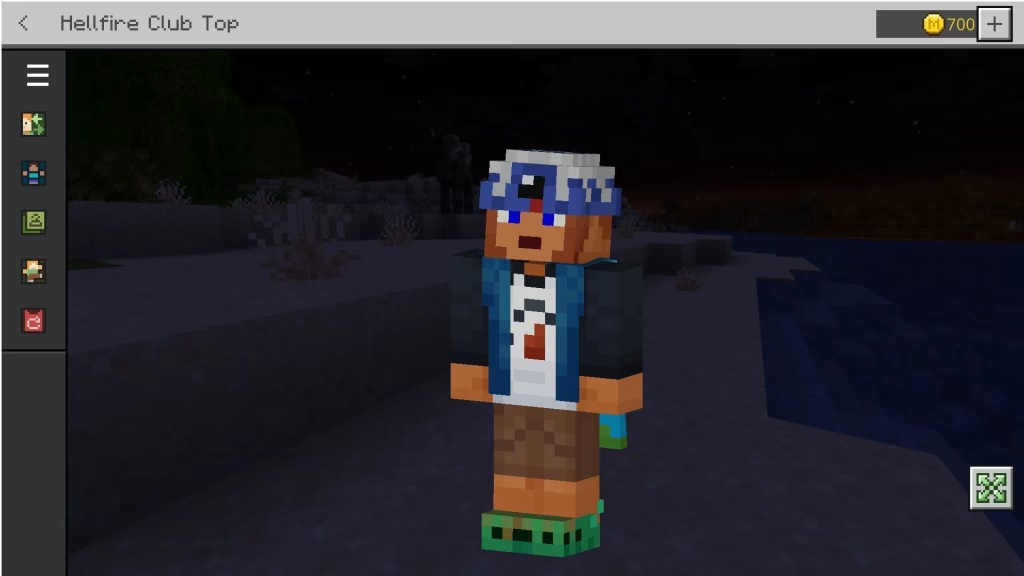
Mojang Studios is celebrating the release of their epic Stranger Things DLC with a promotional giveaway that every Eddie Munson fan needs—a completely free Hellfire Club T-shirt for your Minecraft Bedrock character. This limited-time cosmetic captures the iconic D&D club design from Season 4, and it costs absolutely zero Minecoins to claim.
Table of Contents
What Makes This Giveaway Special
The Hellfire Club T-shirt perfectly recreates the devil and flames logo that Eddie wore throughout Stranger Things Season 4. Unlike typical Marketplace cosmetics that require Minecoins, Mojang is giving this character creator item away free to promote the new Stranger Things add-on launching alongside Season 5’s final chapter.
This isn’t just fan service—it’s a wearable piece of Netflix nostalgia that complements the full Stranger Things DLC experience, which features every major character and location from all five seasons.
Minecraft Claim Guide: Get It in 3 Minutes
| Step | Action | Details |
|---|---|---|
| 1 | Sign in | Launch Minecraft Bedrock with Microsoft account |
| 2 | Navigate | Open Dressing Room from main menu |
| 3 | Locate | Check Featured Items catalog (bottom section) |
| 4 | Claim | Click Hellfire Club T-shirt → Press “Get” button |
| 5 | Equip | Find it under “Top” tab in Character Creator |
Pro Tip: The shirt usually appears as the first item in Featured Items, but if you don’t see it immediately, slide through the catalog—it’s definitely there waiting for you.
Detailed Step-by-Step Instructions
Step 1 – Microsoft Account Required: Open Minecraft Bedrock Edition and ensure you’re signed in with your Microsoft account. This step is crucial because it links the free cosmetic to your account permanently across all platforms where you use Bedrock Edition.
Step 2 – Access the Dressing Room: From the main menu, locate and click the Dressing Room option. This is your hub for all character customization options, from skins to individual clothing pieces.
Step 3 – Browse Featured Items: Scroll to the bottom of the Dressing Room interface where you’ll find the Featured Items catalog. This rotating selection showcases promotional items, seasonal content, and limited-time freebies.
Step 4 – Claim Your Shirt: Click on the Hellfire Club T-shirt thumbnail to open its product page. In the bottom right corner, you’ll see a “Get” button instead of a Minecoin price. Click it to add the shirt to your wardrobe instantly—no payment processing, no confirmation screens.
Step 5 – Rock Your New Look: Equip the shirt immediately or save it for later. Navigate to the Character Creator section and select the “Top” tab to find all your shirt options, including your brand-new Hellfire Club gear.
Limited Time Warning
While Mojang hasn’t announced an official end date, promotional giveaways typically expire once the marketing push concludes. With Stranger Things Season 5 arriving soon and the DLC already live, this freebie could disappear anytime within the next few weeks.
For comparison, previous Minecraft promotional cosmetics remained free for 2-4 weeks before transitioning to paid items or disappearing entirely. Don’t risk missing out—claim yours today.
Want to maximize your Stranger Things DLC experience? Check our complete Stranger Things DLC gameplay guide and Minecraft cosmetics collection tips to build the ultimate character wardrobe.
For official Minecraft updates and Marketplace additions, visit the Minecraft official website where Mojang announces all new content releases.
Frequently Asked Questions
Q: Can I claim the free Hellfire Club T-shirt on Java Edition, or is it only for Bedrock?
This promotional cosmetic is exclusively available for Minecraft Bedrock Edition through the Dressing Room’s Character Creator system. Java Edition doesn’t have access to the Marketplace or Character Creator features, so Java players cannot claim this item through official channels. However, Java Edition supports custom skins, so you could find community-created Hellfire Club shirt skins on sites like Planet Minecraft or NameMC as alternatives, though these won’t be the official Mojang version with the exact design.
Q: If I claim the shirt now, will I keep it forever, or does it expire after a certain period?
Once you claim the Hellfire Club T-shirt during the promotional period, it becomes a permanent part of your Minecraft Bedrock account wardrobe. You’ll retain access to it indefinitely across all platforms where you sign in with your Microsoft account—Xbox, PlayStation, Nintendo Switch, mobile devices, and Windows 10/11 PC. The “limited time” aspect only refers to the claiming window; after the promotion ends, new players won’t be able to get it free, but existing owners keep it forever. Think of it like claiming a game during a free weekend—once it’s yours, it’s yours to keep.




