
Bedrock players, the wait is finally over. Closed Captions have arrived in Minecraft Bedrock Edition 26.20 — a hotly requested feature that now lets you customize caption positioning, duration, and sound types directly in-game. Whether you play with the sound off, have hearing difficulties, or simply want a tactical edge locating nearby mobs, this guide has you covered. Minecraft Feedback
Table of Contents
What Are Closed Captions in Minecraft?
Closed captions (also known as subtitles) display text for sounds in-game. The feature is mainly intended for players who have hearing impairments, are deaf, or play with sounds off — but they can also be used for hearing quieter sounds, locating sounds, or identifying sounds a player doesn’t recognize. Minecraft Wiki
You can read more about the broader history of closed captioning on Wikipedia to appreciate why this is such a meaningful accessibility addition.
For more Minecraft Bedrock guides and update breakdowns, visit TechnoSports and our dedicated Minecraft coverage page.
How to Enable Closed Captions in Minecraft Bedrock 26.20
Enabling closed captions is quite straightforward — simply head to the Accessibility settings and enable the feature from there. Here’s the step-by-step:
- Launch Minecraft Bedrock Edition (update 26.20 or later)
- Open the Settings menu from the main screen or pause menu
- Navigate to Accessibility
- Locate the Closed Captions toggle and switch it ON
- Customize your preferences (see below)
Once enabled, you will be able to see captions for each sound in the game, and you can also tweak its settings according to your preference from the accessibility settings.
All Closed Captions Settings Explained
| Setting | What It Does |
|---|---|
| Own Sounds Toggle | Show/hide captions for your character’s sounds (footsteps, burps, hurt sounds) |
| Weather & Ambient Sounds Toggle | Show/hide captions for rain, wind, and cave ambience |
| Caption Position | Place captions at top-right or bottom-right of screen |
| Caption Duration | Set how long each caption stays on screen (1–4 seconds) |
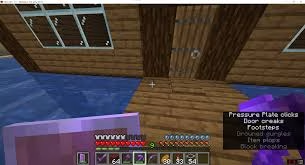
In Bedrock Edition, captions appear on the opposite side of the chat by default (usually top-right), and the background opacity is affected by the “Chat Background Opacity” option, while font color can be adjusted in chat settings. Minecraft Wiki
Why This Feature Is a Game-Changer
It’s not just an accessibility feature — it’s a genuine gameplay tool. Closed captions not only help players who are physically challenged, but can also help others locate hidden entities or items that are not shown on the screen. Hearing a creeper sneaking behind you is one thing — seeing its caption pop up before it explodes is another level of awareness entirely.
If the sounds are offscreen, directional arrows point in the direction the sound is coming from, making it incredibly useful for PvP or survival situations where mob awareness can mean the difference between life and death. Minecraft Feedback
Pro Tips for Using Closed Captions Effectively
- Set duration to 3–4 seconds if you want captions to linger long enough to read during fast-paced gameplay
- Turn off own sounds to reduce caption clutter from your own footsteps and actions
- Disable weather/ambient sounds if you’re in a busy environment and only want creature or player-related captions to appear
- Bottom-right placement mirrors the Java Edition layout if you’re used to switching between versions
FAQs
Q: Are closed captions available on all Bedrock platforms like Xbox, PS5, and mobile?
Yes — since closed captions are part of the Bedrock 26.20 accessibility settings, they are available across all platforms that run Bedrock Edition, including consoles, PC, and mobile.
Q: Can closed captions help me find mobs I can’t see on screen?
Absolutely — captions display directional arrows pointing toward off-screen sounds, making it much easier to detect nearby mobs, even through walls or around corners.




