
Your machines keep shutting off and you have no idea why. Welcome to Solarpunk’s energy system — the cozy survival game’s sneakiest progression wall. 1“The energy system in Solarpunk is easy to underestimate. At first, power looks simple: build a generator, add fuel, connect a machine, and move on. Then you unlock solar panels, drills, sprinklers, batteries, switches, windmills, and powered docks, and your base starts shutting things off for reasons that are not obvious.”11 Launched on June 8, 2026, on Xbox Game Pass, PS5, and Nintendo Switch 2, this cozy survival game from two-person German studio Cyberwave replaces combat with a weather-driven renewable energy grid powering automated farming drones and base systems.
This guide breaks down every power source, the exact numbers you need, and the build order that stops blackouts forever.
Table of Contents
Solarpunk Energy — Overview
| Detail | Info |
|---|---|
| Game | Solarpunk |
| Developer | Cyberwave |
| Publisher | rokaplay |
| Release | June 8, 2026 |
| Platforms | PC (Steam/Epic), PS5, Xbox Series X|S, Switch 2 |
| Game Pass | ✅ Day One |
| Price | $22.99 (free on Game Pass) |
| Energy Sources | Solar Panels, Windmills, Water Generators |
| Storage | Batteries (upgradeable capacity) |
| Co-op | Up to 4 players (same platform only) |
The Three Energy Sources — Know Your Generators
11 Players build solar panels, wind turbines, and water generators to produce electricity. Output varies with in-game weather — rain reduces solar efficiency, and overcast conditions affect turbine yield — so players must diversify sources and store surplus power in battery banks.
| Generator | Produces When | Stops When | Best For | Unlock Tier |
|---|---|---|---|---|
| ☀️ Solar Panel | Daytime + clear skies | Night + rain/storms | Cheap early power | Tier 2 |
| 💨 Windmill | Windy conditions (day & night) | Calm weather | 24/7 supplemental power | Tier 3 |
| 💧 Water Generator | Near flowing water (constant) | Never (if placed correctly) | Late-game base stability | Tier 3+ |
7 Solar Panels are cheap and effective, but they completely stop working after sunset. That means your automated systems can suddenly lose power unless batteries are available. Windmills quickly became a favorite early-game generator because they continue spinning day and night.
Solar Panels — Your First Generator
8 Solar Panel research says it generates energy when exposed to the sun. They’re the cheapest and earliest power source you’ll unlock. However, they have a critical weakness — zero output at night and reduced output during rain.
Placement Tips:
- Place solar panels in open sky with no obstructions above them
- Angle toward the sun path for maximum exposure
- Never place under roofs or trees — even partial shade kills efficiency
Windmills — The Day-Night Solution
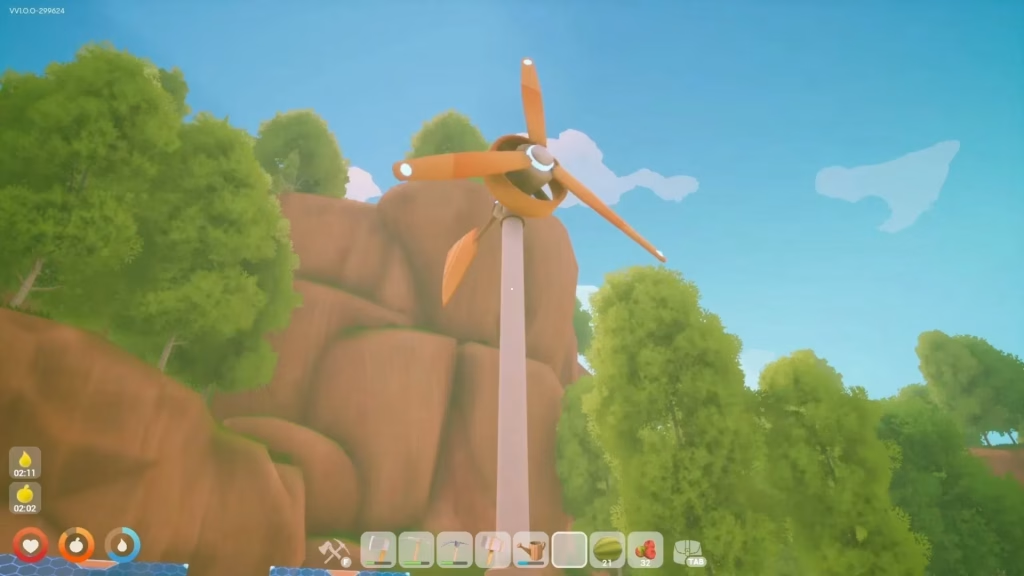
8 Windmill research says output is based on current wind strength. A large wooden windmill produces around twice as much energy as a regular windmill.
| Windmill Type | Output | Best Placement |
|---|---|---|
| Regular Windmill | Base output | Elevated positions |
| Large Wooden Windmill | ~2x regular | Highest point on your island |
7 Place wind generators as high as possible. Elevation directly affects wind strength and therefore power output. If your base sits on uneven terrain, build windmills on the highest ridge or cliff edge available. 4 Stormy weather actually increases their usefulness, making them a perfect complement to solar arrays.
Water Generators — The Endgame Powerhouse
7 Hydroelectric power provides the best long-term stability whenever available. Water generators produce consistent power regardless of time of day or weather — but they require proximity to flowing water and are locked behind later research tiers. 1 Solarpunk supports water power as part of its renewable energy systems. Do not delay your early base waiting for it, though. Solar panels, batteries, switches, and later windmills are the practical route for most early and mid-game power problems.
Batteries — Why Your Base Dies at Night (and How to Fix It)
18 Weather directly affects power generation in Solarpunk. Solar panels excel during sunny days. Wind turbines perform better during storms. Batteries bridge the gap between these changing conditions. Without sufficient battery storage, power shortages can shut down critical systems instantly.
| Battery Upgrade | Max Storage |
|---|---|
| Base Battery | 2,200 |
| Upgrade 1 | 3,500 |
| Upgrade 2 | 5,500 |
| Upgrade 3 | 8,000 |
8 Battery research says each battery has limited intake and output. Batteries store excess power and release it when production drops; each battery has intake and output limits.
Battery Rules:
- 7 Always build extra battery capacity before expanding automation.
- Each battery has separate intake and output caps — adding more batteries increases both
- Upgrade batteries as soon as research allows — the jump from 2,200 to 8,000 is enormous
The Golden Ratio — Your First Stable Grid
6 For a starter base, build 4 Solar Panels + 2 Wind Turbines + 4 Batteries. This combination covers all basic devices (Workbench, Research Table, 4 Auto-Sprinklers) through any weather, day or night.
| Component | Quantity | Purpose |
|---|---|---|
| Solar Panels | 4 | Daytime generation |
| Wind Turbines | 2 | Night + storm backup |
| Batteries | 4 | Nighttime storage buffer |
| Network Display | 1 | Monitoring (optional but critical) |
1 Your first stable route should be: Energy Workbench → Solar Panels → Cables → Network Display → Drill → Battery.
The Network Display — Stop Guessing, Start Managing
1 The Network Display helps you see how much power your grid is generating, consuming, and storing. Build it early so you stop guessing why machines turn off.
| Network Display Shows | Why It Matters |
|---|---|
| Current Generation | Know exactly how much power you’re producing |
| Current Consumption | See which machines are drawing the most |
| Battery Level | Monitor stored reserves |
| Network Health | Identify machines on the wrong cable |
1 The most common mistake is treating power as a yes-or-no system. It is not. Your grid has four separate questions: that is why the Network Display matters so much.
Cables, Switches & Smart Grids
Cables — The Invisible Backbone
Every powered device must be connected via cables to a generator or battery network. 8Power is a network problem, not just a generator count. Unconnected machines won’t draw power even if generators are nearby.
Switches — The Power Saver
1 Put sprinklers on their own cable branch with a switch. Turn them off during rain or when your battery storage is low. Use switches to separate branches of your grid. Put sprinklers, drills, or optional devices like the Advanced Dock on controllable lines so they do not all compete for power at once.
| Branch | Devices | Switch Usage |
|---|---|---|
| Essential (Always On) | Workbench, Research Table, Furnace | No switch — always powered |
| Farming (Toggleable) | Sprinklers, Water Pump | Switch OFF during rain |
| Mining (Toggleable) | Drills | Switch OFF when not mining |
| Optional (Low Priority) | Advanced Dock, Lights | Switch OFF when battery < 30% |
Sensors & Logic Blocks — Automation Tier
8 This device can, for example, turn lights or sprinklers on and off depending on time and weather. Connect your lamps on one side and the power source on the other side. Then connect a day/night sensor in the middle that opens and closes the energy circuit when it turns on/off. If you want the lights on during the day instead of at night, use the button to invert the input signal.
Power Consumption — Know Your Load
1 The important takeaway is simple: a drill is not a small device. If your solar panel gives 10 power, a 120-power drill needs the same output as 12 panels before you even count weather, night, sprinklers, or the Advanced Dock. That does not mean you must build 12 panels immediately. It means you should not connect a drill to a tiny starter grid and expect it to run all day.
| Device | Power Draw | Priority |
|---|---|---|
| Workbench | Low | Essential |
| Research Table | Low | Essential |
| Sprinkler (each) | Medium | Toggle with switch |
| Drill | Very High (~120) | Needs dedicated generation |
| Advanced Dock | High | Toggle when not in use |
| Automated Greenhouse | High | Late-game addition |
Remote Mining Outposts — Power On the Go
1 Bring a drill, local generation, cables, a battery if unlocked, food, water, and repair supplies. Keep the outpost on its own local grid so the drill is easier to power and troubleshoot.
When mining on distant islands, don’t try to cable back to your main base. Instead, build a self-contained mini-grid:
| Outpost Loadout | Quantity |
|---|---|
| Solar Panels | 6–8 (to cover drill load) |
| Batteries | 2 (for cloudy periods) |
| Cables | Enough to connect everything locally |
| Drill | 1 |
| Network Display | 1 (optional but helpful) |
Energy Progression Route — Phase by Phase
| Phase | Priority | Generators | Storage | Devices Powered |
|---|---|---|---|---|
| 🟢 Early Game | Build Energy Workbench | 2–4 Solar Panels | 1–2 Batteries | Workbench, Research Table |
| 🟡 Mid Game | Add wind + switches | 4 Solar + 2 Windmills | 4 Batteries | + Sprinklers, Drills |
| 🟠 Late Mid | Scale for automation | 6+ Solar + 3 Windmills | 6+ Batteries (upgraded) | + Drones, Greenhouses |
| 🔴 Endgame | Water generators + full auto | Solar + Wind + Water | 8+ Batteries (max upgraded) | Full island automation |
7 Every generator feeds batteries, batteries support automation, automation expands farming, and farming supports exploration and technological growth.
The Automation Chain — Where Energy Meets Farming
7 Simple Soil Plots remain the foundation for agriculture, but adding a Rain Collector creates a renewable water supply that reduces manual labor significantly. Once electricity becomes available, the Motorized Water Pump transforms stored water into pressurized irrigation capable of feeding an entire farm. Connecting that system to Automated Crop Sprinklers means crops practically grow themselves. A single sprinkler efficiently covers multiple farming plots while maintaining consistent hydration. The final upgrade is the Automated Greenhouse, which protects sensitive crops from unpredictable weather while maintaining climate control for maximum efficiency.
| Automation Level | System | Power Required |
|---|---|---|
| Manual | Watering Can + Soil Plots | None |
| Semi-Auto | Rain Collector + Water Pump | Low |
| Full Auto | Sprinklers + Pump network | Medium |
| Maximum | Automated Greenhouse | High |
| Logistics | Transport Drones | Very High |
17 Automation goes hand-in-hand with the energy system. Transport drones can be programmed to gather resources, water crops, and handle harvesting. Once your automated systems are running, you are free to explore, build, or simply enjoy the view.
Common Power Mistakes & How to Fix Them
| Mistake | Symptom | Fix |
|---|---|---|
| Solar only, no batteries | Everything dies at night | Add 2+ batteries per 4 solar panels |
| Drill on starter grid | Entire base loses power | Build dedicated drill grid or 12+ panels |
| No Network Display | “Why won’t this work??” | Build one immediately — it’s cheap |
| All devices on one cable | Power competition | Use switches to separate branches |
| Sprinklers always on | Wastes power during rain | Put on a switched branch or sensor |
| Windmills at ground level | Low output | Elevate to highest point on island |
| No power diversification | Storms kill everything | Mix solar + wind + batteries minimum |
6 Your goal is to balance generation and storage so your base never experiences a blackout.
Energy Tips from the Community
6 Place energy buildings on the highest elevation, production workstations in the middle layer, and farming/storage on flat ground. This vertical zoning naturally separates incompatible functions and minimizes wiring headaches.
- 7 Use power switches to separate essential and decorative circuits. These small decisions make an enormous difference once your island grows into a complex network of machines and automated systems.
- 8 Build power close to the machines that matter first: crafting, water, food support, and storage. Add batteries before scaling drones, sprinklers, or an energy furnace.
- 8 Build the first power network as a small production line: one or two generators, one useful device, and visible storage. After that works, expand sideways with batteries and a network display. Only then add conditional pieces such as sensors, logic blocks, wireless connectors, or sprinklers.
What Makes Solarpunk’s Energy System Special?
11 The game’s defining mechanical departure from the survival genre is its simulated renewable energy grid, which replaces the combat-and-threat loop that drives most survival titles. Instead of managing hostile mobs or stamina-depleting environments, players design and maintain a functioning power network. Solar panels, wind turbines, and water-driven generators are the three production sources. 6 Solarpunk’s energy system is entirely renewable. There’s no coal, no oil, no pollution. This isn’t just a thematic choice — it fundamentally changes how you approach progression. Every energy decision is about sustainability, not exploitation. 4 This isn’t a world destroyed by disaster—it’s a hopeful vision of the future where technology and nature work together. The floating islands, renewable energy systems, modular building mechanics, and relaxing exploration create one of the most enjoyable survival sandbox experiences.
For a full overview of the solarpunk genre and its philosophy, visit the Solarpunk Wikipedia page.
The Bottom Line
1 Keep solar panels in open sky, use batteries for night and rain, put sprinklers on a switch, and prioritize Windmill after Tier 3 if your base still loses power.
Solarpunk’s energy system rewards planning over brute force. Start small with 4 solar panels and 2 batteries, add windmills for 24/7 stability, use the Network Display religiously, and separate your grid with switches. Once water generators come online, you’ll never worry about blackouts again.
Your floating island utopia awaits — just make sure the lights stay on. ☀️💨💧
👉 Also Read: Latest Gaming News & Guides on TechnoSports
👉 Also Read: Trending Tech & Gaming Stories This Week
FAQs
Q: What is the best energy source in Solarpunk?
17 Players generate electricity using solar panels, wind turbines, and water energy. Weather conditions directly affect output: solar panels produce less at night or during rain, so players must store surplus energy in batteries and distribute it through a wireless power network across their base. For beginners, start with 4 Solar Panels + 2 Wind Turbines + 4 Batteries for a stable grid in any weather.
Q: Why do my machines keep shutting off in Solarpunk?
1 The most common mistake is treating power as a yes-or-no system. It is not. Your grid likely has either too much consumption for your generation capacity, no battery storage for nighttime, or all devices competing on one cable network. Build a Network Display to diagnose the issue, then add batteries and use switches to separate essential and non-essential devices.




