
Just launched on January 26, 2026, Highguard brings mounted combat and arcane gunslinging to console players—but default settings won’t cut it. Whether you’re playing on PS5 DualSense or Xbox Series X|S controllers, optimizing your sensitivity, aim assist, and button layout is crucial for winning raids and climbing the ranked ladder arriving in February 2026.
Table of Contents
Why Controller Settings Matter in Highguard
From the creators of Apex Legends and Titanfall, Wildlight Entertainment designed Highguard with cross-play support, meaning console players compete directly against PC mouse-and-keyboard users. The game demands precision aiming while riding mounts, quick ability usage during raids, and instant mount summoning when traversing massive maps.
For competitive shooter fans, Highguard’s unique blend of traditional FPS gunplay with arcane abilities and siege mechanics requires custom settings that balance mounted combat mobility with precise ground shooting.
Optimal Sensitivity Settings
| Setting | Recommended Value | Why It Works |
|---|---|---|
| Look Sensitivity (Horizontal) | 5-6 | Smooth tracking for mounted combat without overshooting |
| Look Sensitivity (Vertical) | 4-5 | Slightly lower for precise headshots while stationary |
| ADS Sensitivity | 0.8-1.0 | Maintains muscle memory consistency |
| Response Curve | Linear | Better for experienced players; Classic for beginners |
| Deadzone | 5-8% | Minimizes stick drift without losing precision |
Pro Tip: Start with sensitivity 5 and adjust by +1/-1 increments based on whether you’re overshooting (lower) or can’t track fast targets (higher). Highguard’s mounted combat requires slightly higher sensitivity than games like Call of Duty.
Aim Assist Configuration
Highguard features robust aim assist options similar to Apex Legends, helping controller players compete with PC users:
Target Compensation: ON (enables aim slowdown when hovering over enemies)
Aim Assist Strength: 0.6-0.7 (balances natural aim with assistance)
Rotation Strength: Medium (prevents over-rotation during mount riding)
Since you’ll frequently engage enemies while riding mounts at high speeds, aim assist must compensate for both your movement and theirs without feeling “sticky” during ground combat.
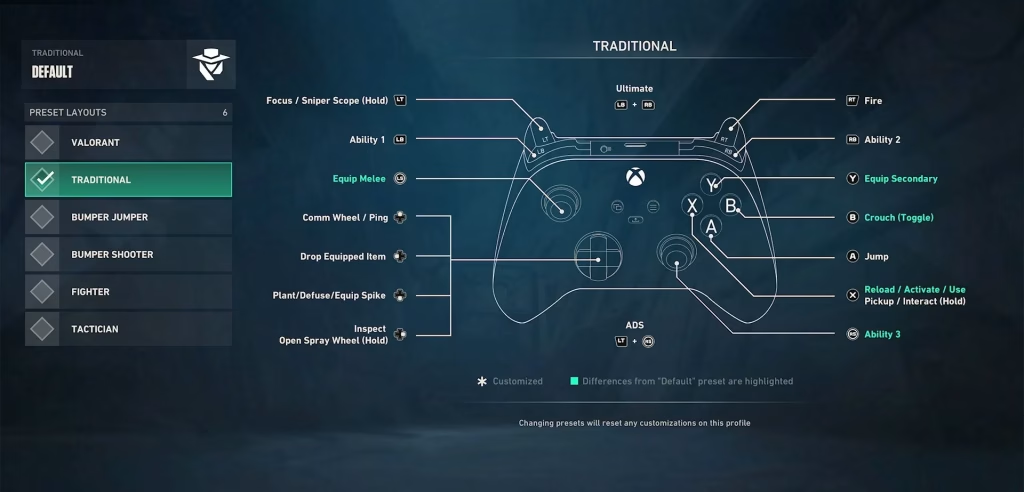
Button Layout & Bindings
| Action | Default | Optimal Binding |
|---|---|---|
| Mount Summon | D-Pad Up | L3 (Left Stick Click) |
| Tactical Ability | L1/LB | Keep default |
| Ultimate Ability | L1+R1 / LB+RB | Keep default |
| Reload | X/Square | Keep default |
| Jump | A/X | Keep default |
| Crouch/Slide | B/Circle | R3 (Right Stick Click) for faster slides |
Critical Change: Remapping Mount Summon from D-Pad to L3 lets you summon without taking your thumb off the aim stick—essential when you need emergency mobility during firefights.
For console gaming enthusiasts, these bindings mirror competitive Apex Legends layouts, making the transition smoother for players coming from Respawn’s battle royale.
Advanced Controller Tips
1. Enable Trigger Stops (If Available):
On Elite Series 2 or SCUF controllers, set hair triggers for faster semi-auto weapon firing.
2. Vibration Settings:
Turn OFF controller vibration—it reduces accuracy during sustained firefights and drains battery faster.
3. Field of View (FOV):
Set to 100-110. Higher FOV helps track enemies during mounted combat but may reduce performance on base PS5/Xbox Series S.
4. Motion Blur:
Disable completely. Motion blur makes tracking moving targets on mounts significantly harder.
5. 120 FPS Mode:
If using PS5 or Xbox Series X with a 120Hz display, enable Performance Mode for smoother aiming and reduced input lag.
Warden-Specific Adjustments
Different Wardens benefit from tweaked settings:
Condor (Recon): Higher sensitivity (6-7) for quick bird Ultimate scanning
Atticus (Assault): Medium sensitivity (5) for balanced lightning ability + gunplay
Kai (Defense): Lower sensitivity (4-5) for precise Ice Wall placement
Redmane (Assault): Higher sensitivity (6) for aggressive wall-slashing mobility
Practice Settings in Training Mode
Before jumping into Raid Mode, spend 15-20 minutes in the training area testing:
- Mounted shooting accuracy at various speeds
- Quick mount summoning during combat
- Ability usage without fumbling buttons
- ADS transitions from hip-fire
- 180-degree turns for situational awareness
Console-Specific Considerations
PS5 DualSense Features:
- Adaptive trigger resistance mimics weapon recoil (can be disabled if distracting)
- Haptic feedback provides mount gallop vibrations (consider disabling for competitive play)
Xbox Series X|S:
- Take advantage of Dynamic Latency Input (DLI) for reduced input lag
- Use Xbox Wireless Controller firmware updates for optimal performance
Common Controller Mistakes to Avoid
Mistake #1: Using Default D-Pad for mount summon—wastes critical thumb positioning time
Mistake #2: Maxing out sensitivity too early—start conservative and increase gradually
Mistake #3: Ignoring ADS sensitivity—this should match your playstyle (lower for snipers, higher for SMGs)
Mistake #4: Not adjusting per-Warden—each character’s abilities benefit from customized settings
Ranked Mode Prep (February 2026)
With Ranked Mode launching in the first post-launch update (two weeks after release), competitive controller players should:
- Finalize settings during the casual pre-season period
- Practice mounted Shieldbreaker carrying under pressure
- Master quick mount destruction shots on enemy riders
- Develop muscle memory for ability combos without looking at buttons
Wildlight Entertainment confirmed cross-play will be maintained in Ranked, so controller optimization isn’t optional—it’s mandatory for climbing the leaderboard.
The Bottom Line
Highguard’s unique mounted combat system demands controller settings that differ from traditional shooters. Higher base sensitivity compensates for horseback movement, remapped mount summons prevent thumb delays, and tuned aim assist balances the PC vs. console playing field.
Download Highguard free on PlayStation Store or Microsoft Store, and visit Highguard’s official site for updates.
Don’t forget to tweak settings regularly as you improve—what works for casual matches may need adjustment once Ranked Mode arrives and competition intensifies.
FAQs
What’s the best controller sensitivity for Highguard?
Start with 5 horizontal and 4 vertical sensitivity, then adjust based on whether you prefer mounted combat (higher) or precision ground shooting (lower). Most competitive players settle around 5-6.
Should I remap buttons for Highguard on PS5/Xbox?
Yes—remapping Mount Summon from D-Pad Up to L3 (Left Stick Click) is essential for maintaining aim while summoning your horse during combat situations.




