
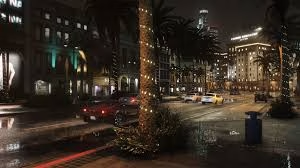
If you thought Grand Theft Auto V couldn’t look any better, think again. The legendary NaturalVision graphics mod has just dropped a major free update, and it’s nothing short of a visual revolution. For years, this mod has been the gold standard for transforming Rockstar’s classic into a photorealistic masterpiece, but this latest patch pushes the boundaries of what’s possible on PC.
Whether you’re a screenshot enthusiast, a role-player, or just someone who loves cruising down Vinewood Boulevard at sunset, this update is mandatory. Let’s dive into what makes this release so special and how you can get installed.
Table of Contents
Why This Update Changes Everything
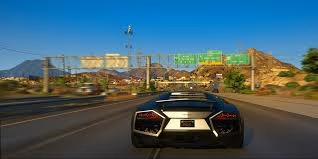
Graphics mods often tweak colors or add sharpness, but NaturalVision goes deeper. This free update overhauls the lighting engine, reworks weather patterns, and introduces ray-traced reflections that make puddles look indistinguishable from real life. It turns Los Santos from a game world into a living, breathing city.
For more deep dives into the best PC mods, hardware benchmarks, and optimization tips to run these heavy visuals smoothly, make sure to visit our dedicated section at Gaming Technosports.
What’s New in the Latest Version?
The changelog is extensive, but here are the headline features that will blow your mind:
| Feature | Improvement | Visual Impact |
|---|---|---|
| Lighting Engine | Complete Ray Tracing Overhaul | Realistic shadows and global illumination |
| Weather Systems | Dynamic Volumetric Clouds | Storms feel ominous; sunsets look painterly |
| Texture Quality | 4K/8K Road & Building Textures | No more blurry asphalt or repeating patterns |
| Water Physics | Enhanced Reflections & Refraction | Ocean waves interact realistically with light |
| Night Vision | Improved Streetlight Glow | Reduced “fog” effect; clearer night driving |
How to Install Safely
Installing heavy graphics mods can be tricky if you aren’t careful.
- Backup Your Game: Always copy your original game files before modding.
- Download the Installer: Get the official free update from the NaturalVision website or trusted sources like Nexus Mods.
- Follow the Guide: The new installer is automated, but ensure you have the latest version of OpenIV installed.
- Optimize Settings: This update is demanding. You may need to lower some in-game settings to maintain 60 FPS, even on high-end rigs.
Tweaking your settings for maximum fidelity while maintaining performance is an art form, similar to optimizing frame rates for competitive esports titles. If you need help balancing visuals and speed, our guides at Gaming Technosports have you covered.
According to early user reports and technical breakdowns, this update utilizes new shader techniques that were previously thought impossible for the RAGE engine, marking a significant milestone for the modding community (Source: Sportskeeda GTA).
Final Thoughts
Los Santos has never looked this good, and the fact that this powerhouse upgrade is completely free is a testament to the passion of the modding community. Fire up your PC, install the update, and take a slow drive through the city. You might forget you’re playing a game from 2013.
Frequently Asked Questions
Q1: Will this mod work on console versions of GTA 5?
No, NaturalVision and most major graphics overhauls are exclusive to the PC version of GTA 5. Consoles do not support the file modifications required to replace core game assets and shaders.
Q2: Does this update affect online gameplay?
You generally cannot use heavy graphics mods like NaturalVision in GTA Online as it may trigger anti-cheat flags or cause synchronization issues. It is highly recommended to use this mod strictly in Story Mode or on private, mod-friendly servers to avoid bans.




